
Use tools and searches to list, analyze, and replicate high-value backlinks.
If you want to find backlinks for a site the right way, you need a clear plan, trusted data, and simple steps. I have audited hundreds of domains and built links for startups and large brands. In this guide, I show you how to find backlinks for a site with free and paid tools, spot the best wins fast, and avoid risky links that can hurt rankings.
What a backlink is and why it matters
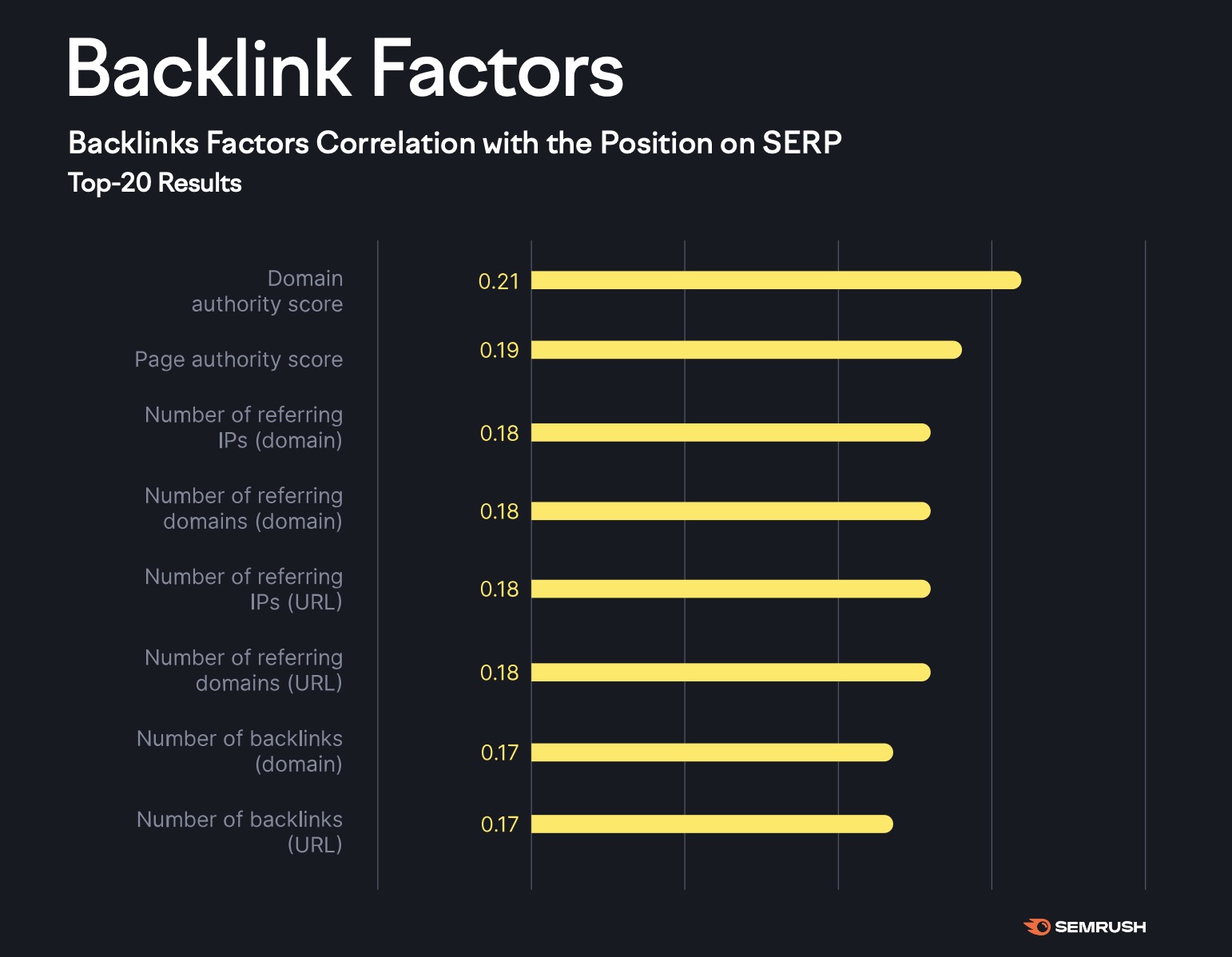
A backlink is a link from one site to another. Search engines use backlinks as votes of trust. More than the count, the quality and relevance of those links matter.
Strong backlinks come from pages with real traffic, topical fit, and clean link profiles. The anchor text should make sense. Natural links come from useful content and trusted mentions. Low-quality links from spam sites can do harm.
You do not need every link your rivals have. You need the links that help users and prove your value. That is how you find backlinks for a site that move the needle and stand the test of time.
How to find backlinks for a site: quick-start checklist
Use this simple flow to get results fast.
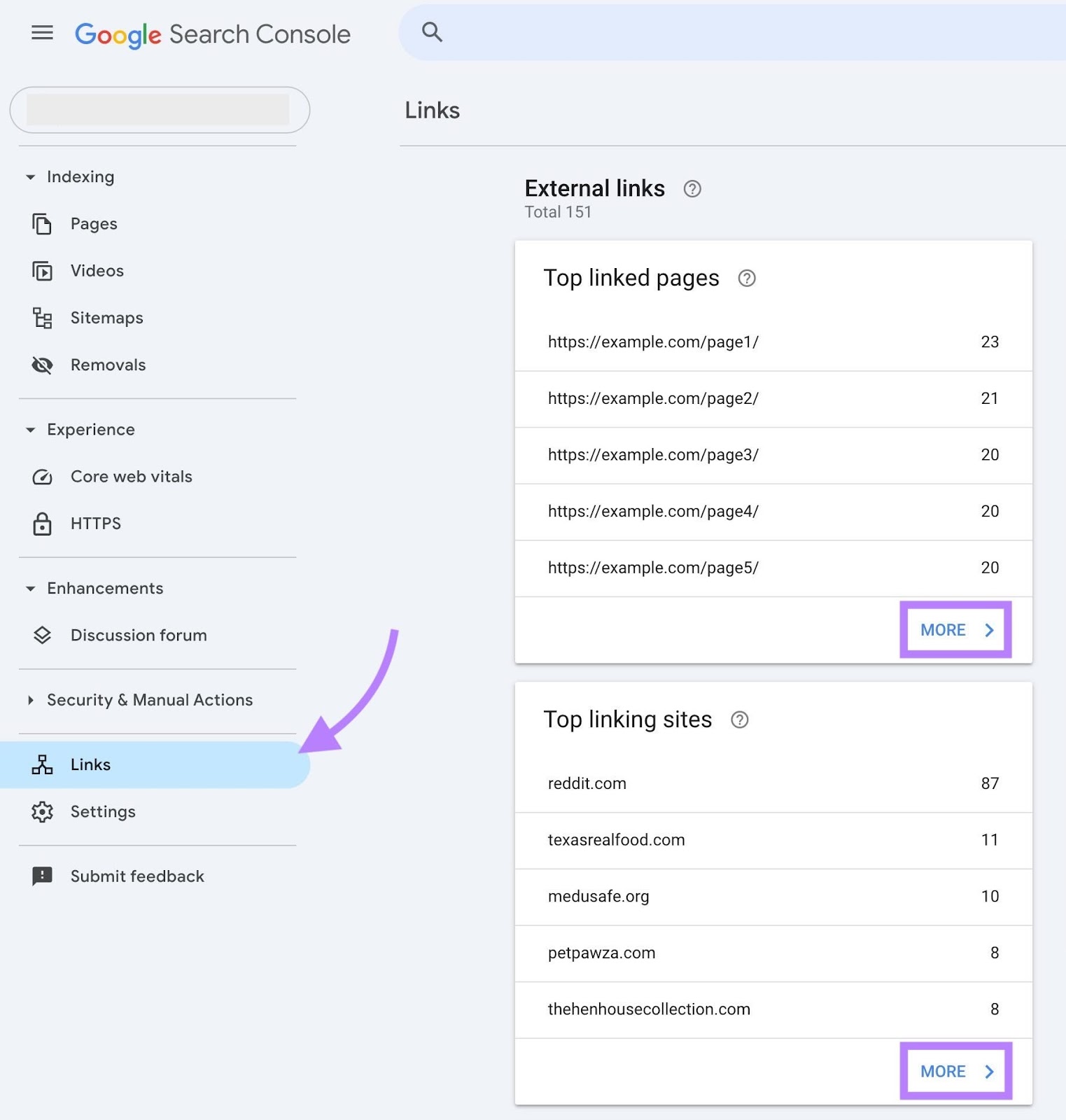
- Set up Google Search Console and verify your site.
- Export your top linked pages and top linking sites.
- List three to five direct SERP rivals for your main keywords.
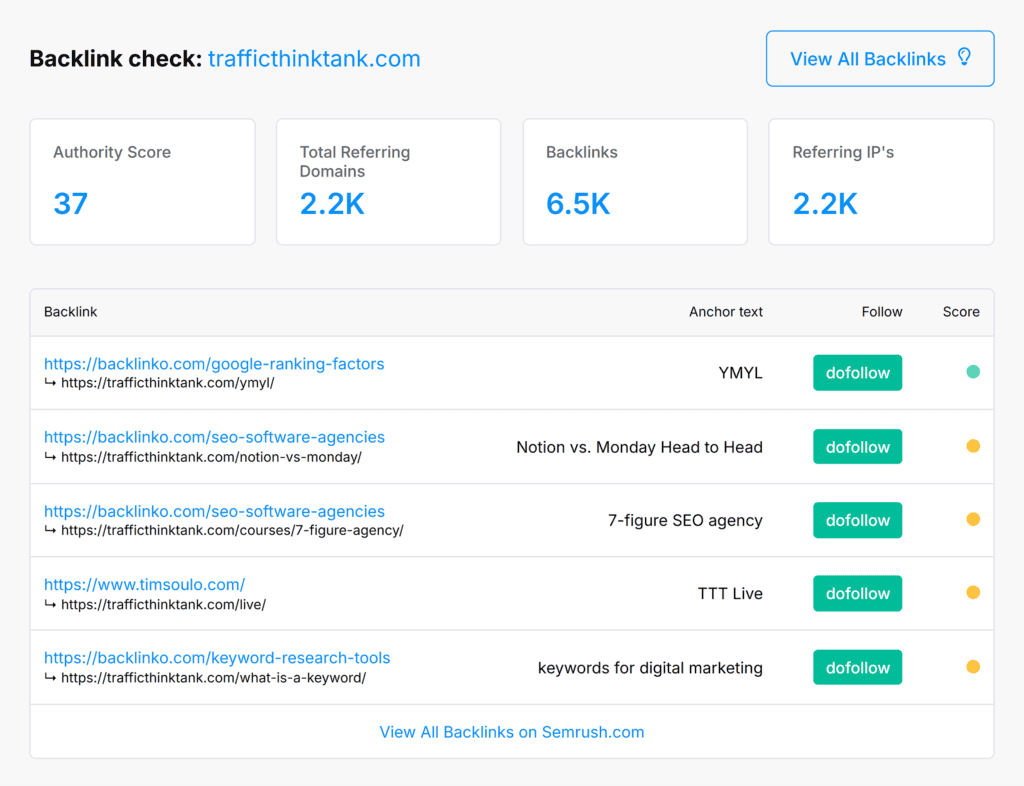
- Use a backlink tool to export their referring domains.
- Group domains, tag by topic, and flag pages with real traffic.
- Spot easy wins such as unlinked mentions and directories with standards.
- Prioritize outreach by impact and ease.
- Track new links and changes each week.
Do this once, then repeat each month. This is the shortest path to find backlinks for a site with focus and speed.
Free methods to find backlinks for a site
You can learn a lot with free sources. It takes time, but it works.
-
Google Search Console
- Open Links report. Export external links and top linking sites.
- Sort by sites that link to many pages. These show strong trust.
- Check anchors. Fix odd anchors on your core pages.
-
Google search operators
- Use "brand name -site:yourdomain.com" to find mentions without links.
- Use "your article title" in quotes to find scrapers or source cites.
- Use "intitle:resources topic" to find resource pages in your niche.
-
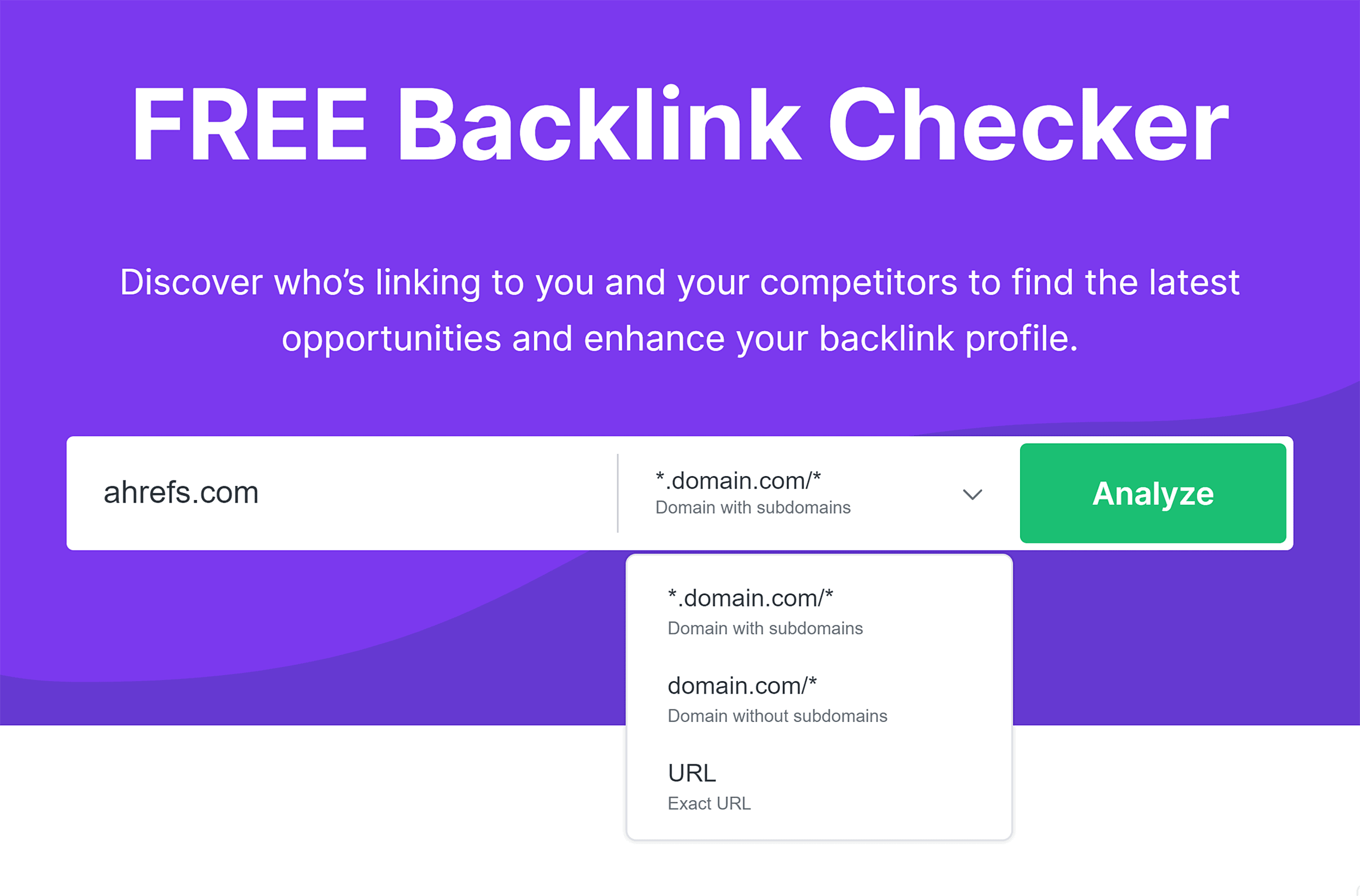
Free backlink checkers
- Use free versions to sample links. Export what you can.
- Cross-check a few tools. Each crawler sees a different slice of the web.
-
Alerts and feeds
- Set brand alerts to catch new mentions. Ask for a link when fair.
- Watch industry newsletters for roundups. Pitch your best guides.
These tactics help you find backlinks for a site without budget. They also teach you what good links look like in your niche.
Using professional tools to find backlinks for a site
Paid tools give deeper crawls, fresh data, and fast filters. Use them to scale.
-
Backlink explorer
- Enter your domain and rivals. Export referring domains and pages.
- Filter by follow links, language, and country.
- Sort by estimated traffic to the linking page. This signals value.
-
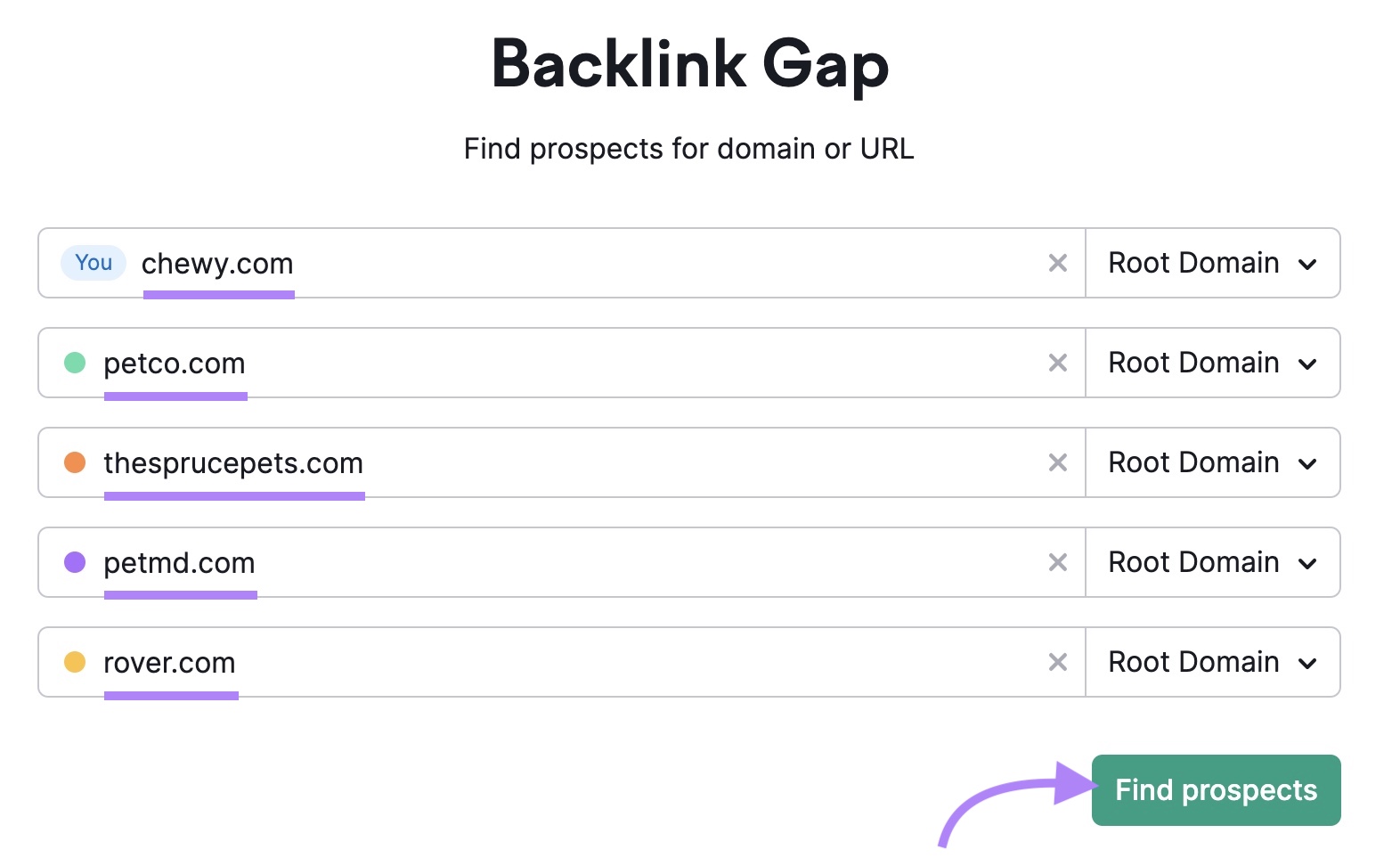
Link intersect
- Add three to five rivals. Find domains that link to them but not to you.
- Tag common sources. These are prime prospects.
-
Top pages and anchors
- Review which of your pages earn links now. Double down on those topics.
- Map anchor text. Keep it natural. Avoid heavy exact match.
-
Toxic link checks
- Flag sites with thin content, odd TLDs, or link-only pages.
- Review in batches. Do not rush to disavow unless you see clear risk.
When you use tools well, you can find backlinks for a site in hours, not weeks. Export, filter, tag, and plan your outreach.
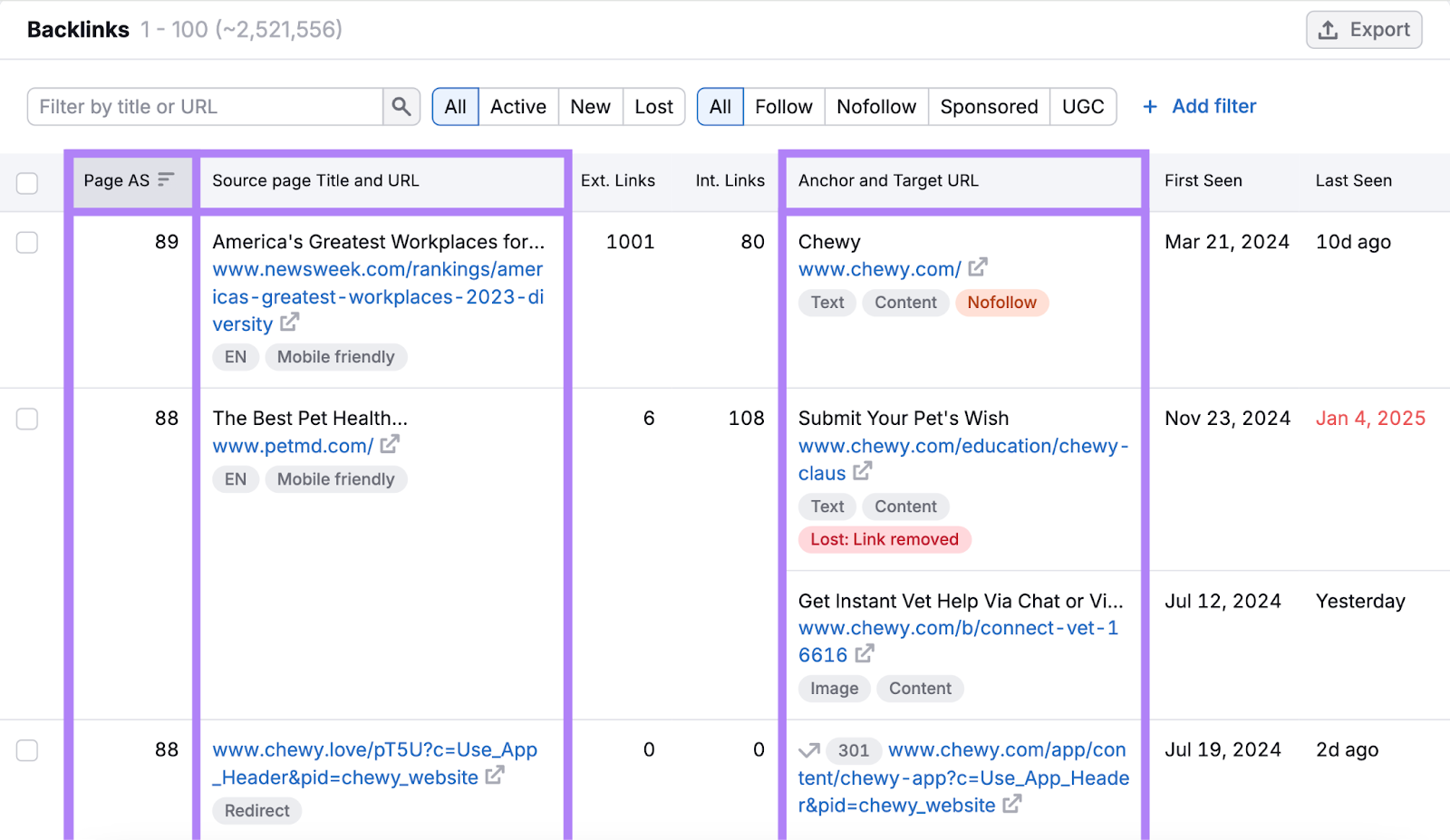
Competitor research to find backlinks for a site
Your rivals already did the hard work. Learn from them.
-
Pick the right rivals
- Use the sites that rank for your target terms now.
- Include one big brand and one site your size.
-
Break down their links
- Group by type: news, blogs, resource pages, tools, forums, directories.
- Note which pages attracted links: data, guides, tools, or stories.
-
Spot repeatable patterns
- Do they earn links from data posts each quarter?
- Do they use industry glossaries, checklists, or templates?
-
Build a gap list
- For each linking domain, ask: Why did they link? Can we match or beat it?
- Add contact info and reasons to care.
This process lets you find backlinks for a site that you can earn with real value, not tricks.
Advanced techniques to find backlinks for a site
When basics work, go further with smart plays.
-
Unlinked brand mentions
- Find pages that name your brand but do not link.
- Send a kind note. Explain how a link helps readers. This converts well.
-
Broken link building
- Use a crawler to find 404 links on resource pages.
- Offer your relevant page as a fix. You help them, they help you.
-
Image credit and reverse search
- Reverse search your charts or photos. Ask for credit with a link.
- Add clear credit text on your site to make the ask easy.
-
Journalist requests
- Reply to source requests with short, useful quotes and data.
- Keep a bio, headshot, and two-line pitch ready.
-
Resource pages and hubs
- Find curated lists in your niche. Pitch your best fit page.
- Make your page scan-friendly with clear headings and plain language.
These moves help you find backlinks for a site that are both white-hat and robust.
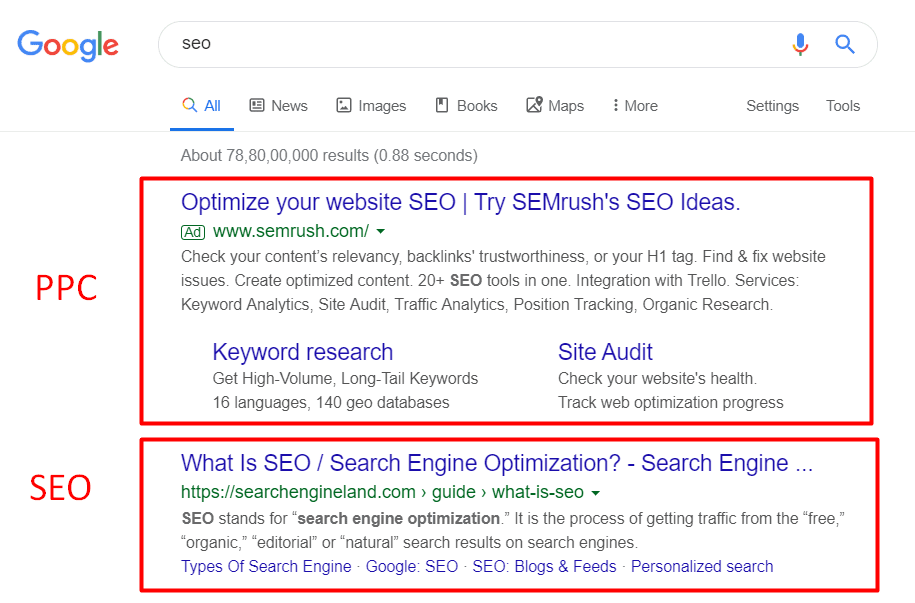
Analyze and prioritize backlinks
Not every link is equal. Score them to focus your time.
-
Page-level checks
- Does the linking page get visits?
- Is your topic a clear fit for that page?
-
Site-level checks
- Is the domain trusted in your field?
- Does it have real authors, contact info, and a clean layout?
-
Link-level checks
- Follow or nofollow. Both can help, but follow often moves rank more.
- Anchor text should read like language, not a keyword dump.
- Check if the link is in the main content, not the footer.
Give each prospect a score from one to five on fit, traffic, and ease. Work the top tier first. This is how you find backlinks for a site and avoid wasted outreach.

Outreach that gets replies
People link to people, not to pitches. Keep it short and kind.
-
Personalize
- Mention a recent post. Praise a point you liked.
- Explain why your page adds value to a specific section.
-
Make the edit easy
- Suggest anchor text that fits the sentence.
- Provide the exact URL and a short one-line summary.
-
Respect time
- 100 words or less. Clear ask. One follow-up after five days.
- Say thanks, even if they say no.
Simple, human outreach helps you find backlinks for a site without burning bridges.
Track, monitor, and clean up
Links change. Keep your wins alive.
-
Monitor
- Set weekly reports in your tool. Watch new and lost referring domains.
- Tag wins by campaign so you can learn later.
-
Fix link rot
- If a linking page changes or breaks, ask for an update.
- Keep your own content fresh so links stay live.
-
Use disavow with care
- Only for clear spam at scale or manual actions.
- Most low-end links are ignored by modern systems.
This steady care helps you find backlinks for a site and keep them working for years.
Real-world examples and lessons learned
From my own work, a few patterns repeat.
-
Unlinked mentions
- We found 42 brand mentions for a B2B tool. 27 became links in two weeks.
- Key was a kind note and a two-line value pitch.
-
Broken link building
- A resources page had three dead links on a core topic.
- We offered a fresh guide and a checklist. Two links landed fast.
-
Local firms
- A clinic earned links from chambers, local news, and niche directories.
- This helped them outrank bigger brands for city terms.
These show how to find backlinks for a site with simple, honest work that helps readers.
Metrics and KPIs to measure success
Measure what matters, not just counts.
-
Referring domains
- Track monthly net growth and link velocity.
-
Quality mix
- Share of links from pages with traffic and topical fit.
-
Link diversity
- Variety in domains, anchors, and page types.
-
Outcome metrics
- Impressions, clicks, and ranking lift on target pages.
- Assisted conversions from linked pages in analytics.
Tie your KPIs to business goals. That is how you find backlinks for a site and prove ROI.
Frequently Asked Questions of find backlinks for a site
What is the fastest way to find backlinks for a site?
Use Google Search Console and a backlink tool to export current links. Then run a link intersect report against rivals to spot quick wins.
How do I know if a backlink is good?
Check topical fit, page traffic, and link placement. If the page helps users and your link adds value, it is likely a good link.
Are nofollow links worth getting?
Yes. They drive referral traffic, build brand trust, and can lead to follow links later. A natural profile includes both types.
Should I pay for backlinks?
Avoid paid links that pass PageRank. They can violate rules and lead to penalties. Invest in content, digital PR, and useful tools instead.
How often should I audit backlinks?
Do a full audit each quarter and a light check each month. Watch new, lost, and changed links so you can react fast.
Can I find backlinks for a site without paid tools?
Yes. Use Google Search Console, search operators, alerts, and free checkers. It takes more time, but it works.
What anchor text should I use when I ask for a link?
Use natural anchors that fit the sentence. Mix branded, partial match, and generic anchors to keep your profile safe.
Conclusion
You now have a clear plan to find backlinks for a site with free and paid tools, smart research, and kind outreach. Start with what you have, learn from rivals, and focus on links that help readers.
Pick one tactic today. Find five unlinked mentions or one broken link to fix. Send two short emails. Small wins add up fast.
If this guide helped, subscribe for more step-by-step SEO guides, or leave a comment with your next question.
Leave a Reply