Top alternatives include ProWritingAid, LanguageTool, QuillBot, Microsoft Editor, and Hemingway.
Writers, students, and teams ask for an effective alternative of Grammarly every day. I have tested these tools across real client work, book projects, and team workflows. In this guide, I break down where each tool shines. You will see clear examples, pricing notes, and setup tips. If you want a reliable alternative of Grammarly that fits your style and budget, this article will help you choose with confidence.
What to look for in an alternative of Grammarly
Before you switch tools, list your must-haves. A good alternative of Grammarly should fix errors, raise clarity, and protect your data. It should also fit your apps and your budget.
Key features to compare:
- Core writing help Grammar, spelling, clarity, style, and tone.
- Rewrite options Paraphrase, shorten, expand, and change tone.
- Plagiarism checking For students, researchers, and publishers.
- Multi-language and dialect US, UK, AU English, plus other languages if needed.
- Integrations Chrome, Edge, Word, Google Docs, Gmail, Slack, and CMS tools.
- Personalization Custom rules, term bases, brand voice, and style guides.
- Team features Roles, shared guides, reporting, and SSO.
- Privacy Data control, local processing options, SOC 2 and GDPR.
- Price and value Free tier limits, monthly vs annual, and team plans.
If you pick an alternative of Grammarly without checking these points, you may pay more and get less. Match features to your daily tasks. Then test with your real files for one week.

Best alternatives of Grammarly A concise overview
Here are top picks that I use and recommend. Each tool has a clear strength. Choose based on your use case, not hype.
-
ProWritingAid Best for deep style reports and fiction or long-form. Strong grammar, style, readability, and structure checks. Desktop, browser, and Word add-ins. Paid plans add more reports and plagiarism checks. A trusted alternative of Grammarly for detailed edits.
-
LanguageTool Best for multi-language and open approach. Good grammar and style, with custom rules. Works in browsers and word processors. A smart alternative of Grammarly if you write in English and other languages.
-
QuillBot Best for paraphrasing and citations. Offers modes like formal, simple, and creative. Includes a summarizer and plagiarism checker. A solid alternative of Grammarly when you need quick rephrasing.
-
Microsoft Editor Best for Microsoft 365 users. It ties into Word, Outlook, and the browser. Good basic grammar and clarity. A budget alternative of Grammarly if you already pay for 365.
-
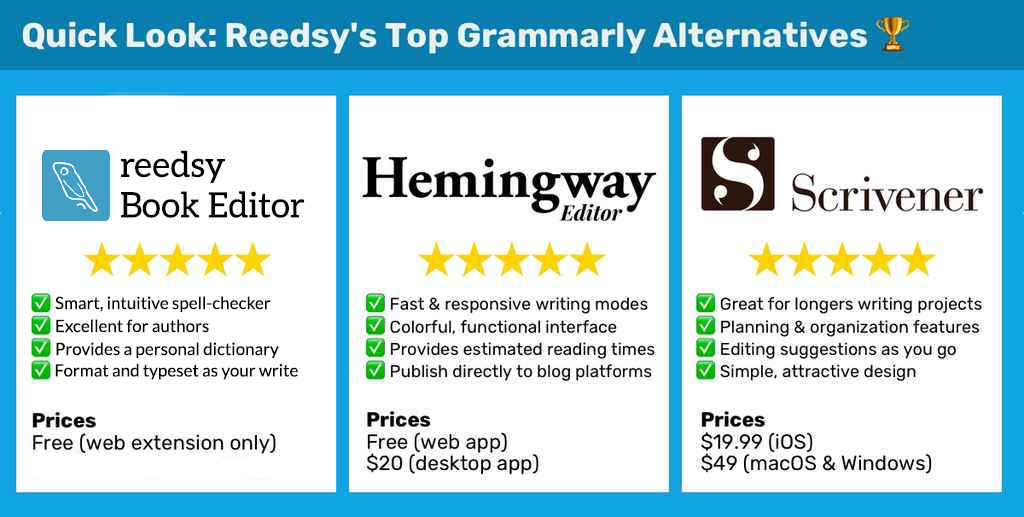
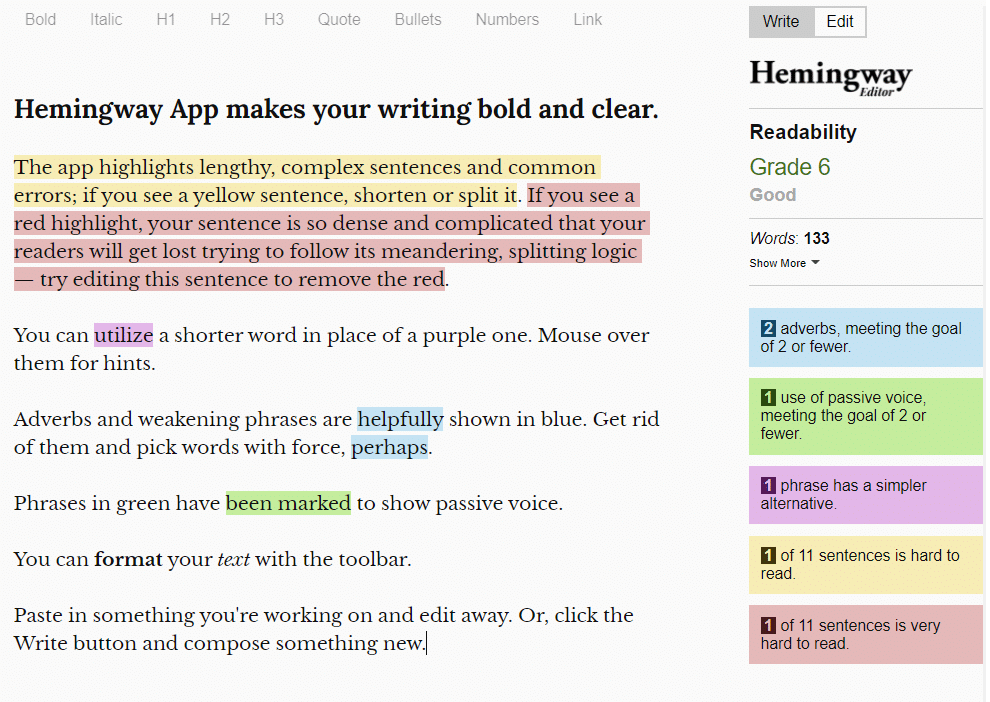
Hemingway Editor Best for clarity and tight prose. Highlights complex sentences and passive voice. No real-time grammar in the same way. A simple alternative of Grammarly for clean, bold writing.
-
Wordtune Best for rewriting and tone shifts. Offers rewrite, shorten, and expand. Great for idea generation. A creative alternative of Grammarly when you need fast variants.
-
Writer Best for brand voice and teams. Style guides, terms, and compliance. Strong enterprise privacy controls. A robust alternative of Grammarly for companies.
-
Sapling Best for customer support and sales teams. Smart autocomplete and snippets. Works in CRM and help desks. A workflow-first alternative of Grammarly for frontline teams.
Hands-on reviews and use cases
ProWritingAid
- Strengths Deep style and structure reports. Great for authors and long articles.
- Weak spots Heavy reports can feel slow. UI has a learning curve.
- Best fit Editors, bloggers, authors, and students.
- Personal tip I use its Readability and Sticky Sentences report before final drafts. It often finds problems Grammarly missed. A reliable alternative of Grammarly for deep revision.
LanguageTool
- Strengths Multi-language support. Custom rules with simple patterns.
- Weak spots Paraphrasing is basic. Reports are lighter than ProWritingAid.
- Best fit Bilingual writers, teams in the EU, and privacy-aware users.
- Personal tip Set your dialect and add custom words. It cuts false flags. A strong alternative of Grammarly across languages.
QuillBot
- Strengths Class-leading paraphrase and summarize. Citation tools help students.
- Weak spots Core grammar is simpler. Tone control is lighter.
- Best fit Students, researchers, and social media writers.
- Personal tip Use the Formal or Simple mode to keep meaning. It is a fast alternative of Grammarly when you need a clean rewrite.
Microsoft Editor
- Strengths Built into Word, Outlook, and Edge. Good basics.
- Weak spots Fewer style insights. Limited brand controls.
- Best fit Microsoft 365 users who want one tool.
- Personal tip Turn on Editor in Word and Outlook. It catches quick fixes in email. A cost-friendly alternative of Grammarly for office work.
Hemingway Editor
- Strengths Clear, bold writing. Great for shortening.
- Weak spots No live grammar. No browser-wide checks.
- Best fit Bloggers, marketers, and anyone who writes long sentences.
- Personal tip Paste your draft and aim for grade 6–8. It keeps your voice strong. A minimalist alternative of Grammarly for clarity.
Wordtune
- Strengths Rewriting and tone tweaks feel human. Good for idea drafts.
- Weak spots Grammar is not the focus. Can over-simplify nuance.
- Best fit Marketers, founders, and product writers.
- Personal tip Try three rewrites and blend the best parts. A nimble alternative of Grammarly for tone shifts.
Writer
- Strengths Brand voice, terms, and compliance. Enterprise-grade privacy.
- Weak spots Overkill for solo users. Setup needs time.
- Best fit Marketing, legal, healthcare, and regulated teams.
- Personal tip Import your style guide and glossary first. It pays off fast. A secure alternative of Grammarly for brand control.
Sapling
- Strengths Autocomplete, snippets, and response logic. Great in support tools.
- Weak spots Less creative help. Focus is on speed and accuracy.
- Best fit Support, sales, and success teams.
- Personal tip Create snippets for top 20 replies. Train the team. A workflow-first alternative of Grammarly for service work.
Pricing and value breakdown
Prices change, but patterns stay steady. Free tiers help you test. Paid plans unlock depth and team features.
- Free tiers LanguageTool, QuillBot, Wordtune, Hemingway, Microsoft Editor. Good for basic checks and light rewrites.
- Mid-range ProWritingAid Premium, LanguageTool Premium, Wordtune Plus. Best for solo pros and students.
- Enterprise Writer and Sapling. Add brand voice, SSO, audit logs, and support.
- Plagiarism checks Often cost extra. Use only if you publish or teach.
Tip Track value per week. If a tool saves one hour, it likely pays for itself. This is key when picking an alternative of Grammarly on a budget.

Privacy, security, and data control
Your words are your IP. Treat them with care. Check where data is processed and stored.
- Data handling Read the privacy policy. Look for opt-out of data training.
- On-device vs cloud On-device reduces risk. Cloud brings more features.
- Compliance Look for SOC 2, ISO 27001, and GDPR. Ask for a DPA if needed.
- Enterprise needs SSO, RBAC, audit logs, and regional hosting.
If privacy leads, LanguageTool and Writer are strong picks. They offer clear controls. That matters if you need a secure alternative of Grammarly for client or patient data.

How to choose the right alternative of Grammarly
Follow a simple path. Keep your tests short and real.
- Define tasks Blog posts, emails, research, support, or fiction.
- Pick three tools Match to your tasks and platforms.
- Test for one week Use real files and real deadlines.
- Compare wins What did it fix that you missed?
- Check speed Does it get in your way?
- Review privacy Is data safe and in the right region?
- Decide and commit Train your team and set rules.
This process helps you pick an alternative of Grammarly that works in daily life, not just in demos.

Quick setup guides and workflows
Make the first week smooth. Here are fast starts that work.
- Google Docs Install the tool’s Chrome or Docs add-on. Turn on suggestions. Draft, then run a full check.
- Microsoft Word Use the Word add-in. Review underlined issues. Run style or clarity passes near the end.
- Email Use the browser extension in Gmail or Outlook. Scan subject lines and first sentences first.
- CMS and blogs Paste into Hemingway for a clarity pass. Then polish with your chosen tool.
- Teams Set a 10-minute rule. No change should add long delays. Good tools speed you up.
These steps make any alternative of Grammarly feel natural in your flow.

Common mistakes to avoid
Switching tools can go wrong. Avoid these traps.
- Over-relying Blind trust can break your voice. Keep what serves readers.
- Ignoring setup Set your dialect, industry terms, and brand rules first.
- Mixing tools Running three checkers at once can clash. Choose one main tool.
- Privacy gaps Turn off data sharing in settings. Review extensions often.
- No review Always do a final human read. Tools guide. You decide.
These points matter with any alternative of Grammarly, no matter how smart it seems.

Frequently Asked Questions of alternative of grammarly
What is the best free alternative of grammarly?
LanguageTool and Microsoft Editor are strong free options. They cover basic grammar and style in common apps.
Which alternative of grammarly is best for paraphrasing?
QuillBot leads for fast and clear paraphrase. Wordtune is also great for tone and flow.
Is there an alternative of grammarly that works offline?
Some desktop apps offer limited offline checks. For full control, check each app’s offline mode and settings.
What alternative of grammarly is best for teams?
Writer and Sapling suit teams that need brand voice and compliance. They include admin controls and shared rules.
Can an alternative of grammarly handle other languages?
LanguageTool supports many languages with solid rules. DeepL Write also helps with rewrites in select languages.
Which alternative of grammarly fits students?
QuillBot and ProWritingAid help with clarity and citations. Use paraphrase tools with care to keep your voice.
Is a plagiarism checker included in every alternative of grammarly?
No, many tools sell it as an add-on. Check plan details before you buy.
Conclusion
There is no one-size-fits-all editor. The right alternative of Grammarly depends on your tasks, privacy needs, and budget. Start with two or three options, test with real work, and measure time saved. Keep your voice, set clear rules, and let the tool support your craft. Ready to choose your best fit? Try a week-long trial, note the wins, and share your results. Subscribe for more guides, or leave a comment with your use case and I will suggest a tailored setup.
Leave a Reply